I love the OLPC News Forum community spirit. Where a request like this one from tacotaxi gets a quick and overwhelming response:
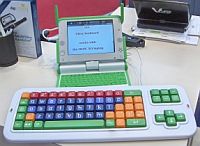
Would this keyboard help?
I'm physically disabled and type with a stick in my mouth. The OLPC is my first and only experience with Linux.Thanks need to go out to Eden, Moocapiean, and LesleyT, as all three rose to the challenge and are activity searching for a solution to Tacotaxi's need for one finger typing.I did find and successfully complete simple instructions on changing nickname on my OLPC. In doing so, somebody had to hold the shift key for the quotes. How can I set up OLPC for one finger typing as in Windows? I need to be able to hit Ctrl+Alt+Erase one key at a time.
If you have any simple instructions for this elderly physically challenged wanna be geek, I will be eternally grateful. At my age I try and stick with the KISS rule... no insult intended. Thank you.
Eden and Moocapiean worked the software angle - they started with the OLPC Wiki on Accessibility and tested different software to give tacotaxi a one-step solution - AccessX. LesleyT is taking a different, more physical angle:
I'm wondering about the physical act of pressing all the buttons at the same time and what could be done hardware-wise. I ask this because I'm trying to envision some sort of quick fix (like a keyboard attachment that physically holds down the needed key) as these guys do the software.If you too can help out, join the Assistive Technology Group on the OLPC News Forum and add to the OLPC Wiki on Accessibility.


Is there a way of extending the virtual time of key "press down" time. and the Terminate and stay resident time inbetween key strokes. Thus tricking the machine into thinking they keys are typed 1 holding,
2 holding, 3 ??. Sort of the inversre of pause time between keystrokes.
Another way might be to use ball bearings atop the keys Ctrl and Alt. A 1/2 dia. ball bearing might do the trick.
Oops, seems like I am reading comprehesion challenged. I quickly glossed over the use of stick and went to "one" hand. Sorry about that, back to plan B.
I will look into this tonight when i get home, did a quick google search and found some promissing results.
Oh and for everyone's refference this is referred to as using "sticky keys"
Moocapiean has pretty much solved the software issue, I think.
http://olpcnews.com/forum/index.php?topic=2063.0
I could see modding a keyboard to use those switches where when you press once, they stay on, and the second press releases it. Like the one on some cars hazard light switch.
What sort of keyboard is that in the picture? That looks really cool.