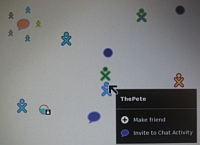
G1G1 Neighbourhood View
Tom Hoffman has set up a virtual machine for load testing and as Rick Evans explains, its amazingly simple to jump in:
- Go to the terminal window.
- sugar-control-panel -g jabber will display your current setting.
- sugar-control-panel -s jabber xochat.org will change to the public server.
- Reboot Sugar with CTRL-ALT-ERASE
- Open up chat (or another activity)
- Go to the neighbourhood view and invite another XO user
- Go back to chat and wait for them to appear
- If the other XO user is looking at their "Home view", they'll see a colored chat icon
- When they click on it they'll join the chat session
You can repeat this process with other activities too. I shared X0 photos with Rick Evans, Argotnaut, and RodFather yesterday afternoon. We even did a video share by making XO videos we could all see.
Now its your turn to explore the full G1G1 community. And remember, if you have problems, just ask for XO laptop help. on the forum.


If you still don't have your XO, Robert has a trick for you to join the Jabber chat through emulation, by going to http://startx.ro/sugar/ and using Xubuntu:
http://olpcnews.com/forum/index.php?topic=396.msg4725#msg4725
.
Once you get connected, try sharing a document via "Write". You can use it like "Chat" but you can also retrospectively edit your comments. This is actually rather useful for people like me who constantly misspell and leave out words during IRC session.
We've been having some interesting chats in the Chat activity. Some bugs seem to appear over time with Users names appearing as '???' and other appearing as 40 hex characters.
I'm sure over the next weeks the dev team will be providing new builds that can be flashed to the XO and fix bugs.
This is great that you have posted this info here, but we need a little more help. You say to go to the teminal window, but you do not say how to do that. I have 2 kids with 2 new XO laptops (and my goliath Dell XPS to chat with you)... can you help?
Another question... there seems to be no built-in email program on these laptops? Am I right? This is most disappointing as I really wanted my kids to be able to communicate with family via email since we live far away from everyone. I have tried using gmail on the XOs with NO luck. Any advice?
There's one other, less-frequent scroll issue that appears in chat sometimes. Instead of opting for the mega-scroll Gremlin, where the arrival, departure, or appearance of a comment causes the screen to scroll way up, sometimes what happens is that the screen doesn't scroll ENOUGH.
When the "not enough scrolling" Gremlin appears, eventually what happens is the most recent line of text is hidden behind the text-entry area on the chat screen.
You can then opt to enter a dummy line containing "." to try and flush it out, but of course then THAT will be hidden behind the text entry window and your conversation partner(s) might enter a "." of their own to see what appears to be yet another line of hidden text. Then you get a bunch of "." entries in a row.
So the insufficient-scroll issue, while it causes less wear-and-tear on the scroll buttons, is still an issue that needs to be resolved.
Chats I've taken part in so far have all had one of the two scrolling issues appear after a while.
Hanna,
The "terminal activity" is the little box with a "$-" in it on the row of activities. Sadly, there isn't an email client that came with G1G1 versions of the XO laptop. You can always use a web-based service like Yahoo.
For more support, check out the OLPC News XO Help forum: http://olpcnews.com/forum/index.php?board=1.0
My activities will not start! Everything worked perfectly for 4 days and now NOTHING will start up. Please help!
Hannah,
Gmail worked great for me. Yahoo Mail sort-of worked, but you cannot upload attachments using the XO browser. As far as I could see, everything worked on Gmail, including attachments.
I have seen somewhere that the geeks who built this thing have installed the Thunderbird email client on their versions of XO. But you need to know Linux, there is no way to uninstall it, and it may not even work on our versions of the XO.
Works! Quite a crowd. First noticed some crazy trackpad problems after viewing the busy neighborhood on xochat.org . Can see Rodfather and Argotnaut amongst the multitudes.
-- Jeff Miller, SF Bay Area
Whats the command line to return to the default setting? I've connected to XOchat but had some technical issues and would like to undo the change. Any leads on the syntax?
-Kevin in Austin
Before changing the jabber setting, you can use
sugar-control-panel -g jabber
to get the current setting. The default is ship2.jabber.laptop.org, so you can get back to factory defaults with:
sugar-control-panel -s jabber ship2.jabber.laptop.org
I want to sell the G1G1 laptop I got for my son! He is 13 and it really does not meet his needs. Plus, we have the wrong kind of router and he can't even go online at home! He has used it ONE TIME (at Panera) other than that, it has sat in the box since Christmas. Where can I sell it?
I am looking to buy one off eBay. They go for somewhat above $300 there, if you include the T.Mobile access, a bit less if you don't.